Challenges in Analysis Work
As analyses grow larger and more complex, the burden is increasing for both analysis specialists and
design engineers.

Learning analysis software
takes time
It's hard to find the time to learn how to operate multiple software tools from scratch.

Building and setting up analysis models
takes significant effort
The larger and more complex the analysis model, the more effort it takes to build the model and
set up the analysis, including boundary conditions and contact.

Checking analysis results for
design decisions takes time
As analysis plays a larger role in design, checking the results needed for design decisions takes
longer, because it means requesting work from analysis specialists and waiting for it.
Solutions with AI Expert

Eliminates the learning cost of GUI operations
There's no need to memorize GUI operations one by one. Just give instructions in natural
language, and AI Expert operates ADVENTURECluster on your behalf.

Automates variant analyses
For analysis specialists, AI Expert automates repetitive variant analyses (analyses in which only
the geometry or some of the conditions differ), even for large, complex models.

Makes checking analysis results easy
Just ask AI Expert a question such as "Where is the maximum stress?" This reduces the time that
both analysis specialists and design engineers spend checking and evaluating results.
About AI Expert
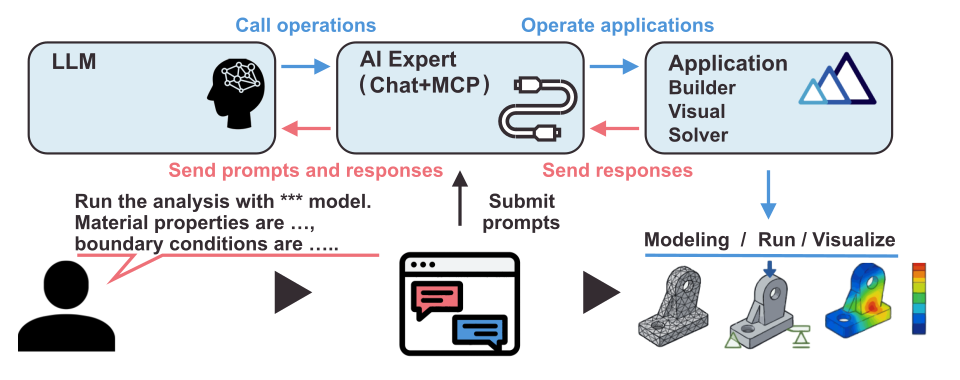
AI Expert is a product that turns the operational know-how of ADVENTURECluster experts into an
AI agent you can put to use. It eliminates the learning cost of mastering GUI operations and keeping
up with new features, and lets you build models, set up analyses, and review results through
natural-language instructions.
For example, just type an instruction such as "Generate a mesh of 6 mm linear tetrahedral elements
for Part A" in the chat, and AI Expert operates ADVENTURECluster automatically to complete the
task. Users don't need to be aware of
complex GUI operations or how MCP works.
AI Expert provides a connector built on the Model Context Protocol (MCP), an open standard,
that lets a large language model (LLM) operate ADVENTURECluster and perform related tasks.
Because of this, it works with a wide range of LLMs, from cloud LLMs you may already be using, such
as Claude and GPT models, to LLMs running on a local, in-house server.
* This process does not involve any access to the external internet (except for the connection to the
LLM you use).
Usage Scenarios
 For analysis specialists
"Run this same analysis procedure, but
replace part XXX with part YYY."
You can leave variant analyses like this to AI Expert. It automatically carries
out the full sequence of operations, from mesh generation and material, boundary condition, and
contact settings through running the analysis, so you don't need to set up similar models from
scratch each time.
You can also have AI Expert take over repetitive parts of the setup, such as applying the same
condition to ten bolts.
 For design engineers
"Show me the stress distribution from the analysis results for this shape."
Design engineers can now ask AI Expert directly for checks that used to require a request to an
analysis specialist. There's no need to learn how to operate the analysis software, and you can
get the results you need right away.
Role in the Design and Analysis Process
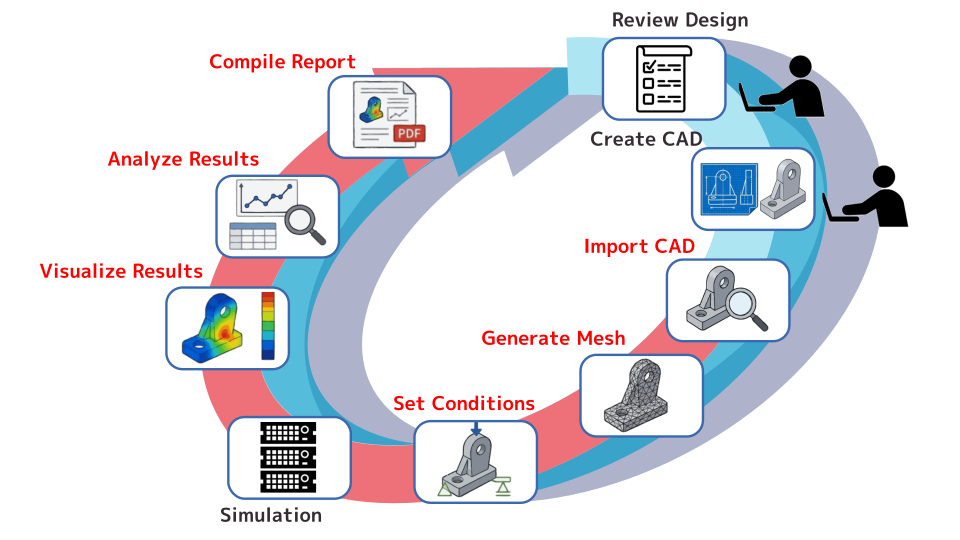
The CAE-based design and analysis process involves many steps, from design studies to report
generation. AI Expert automates the steps from mesh generation through report generation as a
single, continuous process.
How It Works & Key Components
AI Expert consists of three components that work together. At its core is the
"MCP server (AI Expert)," which holds the operational know-how of ADVENTURECluster
specialists. The other two are the "MCP host (AI Expert Desktop)," through which you give
instructions in a chat, and the "large language model (LLM)," which interprets natural language.
Interprets natural-language prompts and keeps track of the work in progress. You can use either a
cloud LLM service (such as Amazon Bedrock or Azure OpenAI) or a local, in-house LLM
server.
This is the chat application that users work in, where the LLM and the MCP server are
configured. It serves as the interface between the user and the LLM. AI Expert Desktop
is a desktop application provided by Allied Engineering, but you can also use your existing MCP
host.
This is the core of AI Expert and holds the operational expertise for ADVENTURECluster. It
serves as the interface with the application, and operates and manages it.
Constraints on the MCP Host
- Because AI Expert works by directly operating ADVENTURECluster on the user's computer, it cannot be used
with web-based AI chat services (such as the web versions of Claude or ChatGPT).
- As of September 18, 2026, Microsoft Copilot is not supported for use with AI Expert.
Supported Analysis Types
As of October 2026, AI Expert can set up the following ADVENTURECluster analysis types and visualize
their results.
- Static analysis
- Dynamic analysis (excluding explicit dynamic analysis)
- Eigenvalue analysis / Vibration analysis *
- Heat transfer analysis
- Fatigue analysis *
- Shape optimization (some features not supported)
- Topology optimization (some features not supported)
* Not supported: modal frequency response, modal transient response, random response, and frequency
spectrum analyses (vibration analysis), and vibration fatigue analysis (fatigue analysis).
Supported Applications
- ADVENTURECluster Builder (pre-processing): model building, mesh generation, boundary condition
settings, optimization settings, and more
- ADVENTURECluster Visual (post-processing): result visualization, graph plotting, animation export,
and more
- Excel integration: workbook operations, charting, automating routine tasks by replaying
operation logs, and more
- Windows operations: getting the username, creating folders, searching for files, and more
* For details on supported features, please contact us via the Contact Form below.
Trademarks
The system and product names used on this page are trademarks or registered trademarks of their respective owners. For details, see Trademarks.
What's Needed to Get Started
You will need access to a large language model (LLM) through a model provider supported by the MCP
host, and the connection settings for that provider.
- Amazon Bedrock: AWS Access Key ID, AWS Secret Access Key
- Azure OpenAI: Azure OpenAI API Key, Azure OpenAI Endpoint, Azure OpenAI Deployment, Azure OpenAI API
Version
- OpenAI Compatible (such as a local LLM): API Key, Base URL
* Environments that apply TLS inspection or similar security measures to these connections are also
supported. Microsoft Copilot is not supported. If you would like to use another model provider,
please contact us to discuss.